

Description
All-in-One Messenger: Unified Chat Hub
Overview
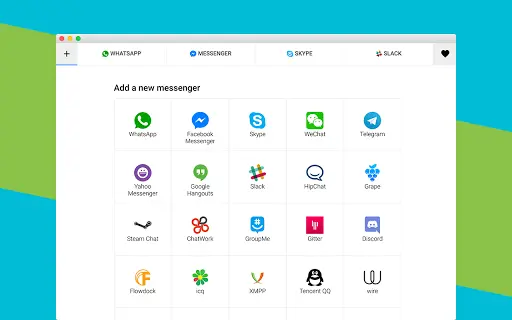
All-in-One Messenger is a desktop application designed to consolidate multiple messaging platforms into a single, streamlined interface. It enables users to access and manage services such as WhatsApp, Facebook Messenger, Slack, Discord, Telegram, and over 20 others from one unified environment. The software is particularly useful for professionals managing multiple business accounts across different platforms, as well as individuals who rely on various chat tools for personal and work-related communication. By centralizing access, it reduces the need to switch between multiple browser tabs or standalone apps, improving workflow efficiency.
The application leverages Chrome technology, including the V8 JavaScript engine, to ensure smooth operation across supported platforms. It is optimized for performance on Chromebooks and other lightweight devices, making it a viable option for users seeking a fast, responsive messaging hub. The developer did not provide additional details about the company or development background. Real-world use cases include team collaboration, customer support management, social media engagement, and personal communication across diverse networks. The software aims to simplify digital communication without compromising security or functionality.
Key Features & Capabilities
- Unified Messaging Platform – Access over 20 messaging services—including WhatsApp, Slack, Discord, Telegram, and Facebook Messenger—from one desktop application. This reduces app clutter and simplifies communication workflows.
- Multiple Instance Support – Use multiple instances of the same service (e.g., two separate WhatsApp accounts or multiple Slack workspaces) simultaneously. Ideal for managing business accounts, client communications, or personal and professional profiles.
- Chrome-Based Architecture – Built using Chrome technology, including the V8 JavaScript engine, ensuring fast performance and compatibility with Chromebooks and other systems running Chrome OS.
- Privacy-First Design – The software does not read, store, or transmit any user messages, login credentials, or data. Each messenger operates in an isolated tab, preventing cross-service data leakage and reducing exposure to tracking.
- Secure Account Isolation – Each messaging service runs in its own secure environment. This prevents interference between accounts and enhances security, especially when managing multiple profiles on platforms like Skype or Facebook.
These features enable users to maintain separate identities across platforms, streamline customer support operations, and improve productivity by minimizing context switching. The isolated tab model also helps prevent cross-domain tracking, offering a privacy advantage over using a single browser for multiple logins.
User Interface, Workflow & Performance
The user interface is built around a tab-based navigation system, where each connected messenger appears as a separate tab. This layout allows for quick switching between services while maintaining visual separation. The design is minimalistic, focusing on functionality without unnecessary visual clutter. Navigation is intuitive, with clear labels and consistent layout across all integrated platforms.
Workflow efficiency is enhanced by the ability to manage multiple accounts simultaneously without logging in and out. The application runs smoothly on systems with standard configurations, thanks to its reliance on Chrome’s optimized runtime. However, exact performance details were not specified by the developer. Resource usage, including CPU and RAM behavior, remains unspecified. General software behavior patterns suggest stable operation under typical usage conditions, but no benchmark data is available. Stability and responsiveness appear to be prioritized, particularly on Chromebook devices, where the app is explicitly optimized.
Compatibility & System Requirements
All-in-One Messenger is compatible with Windows, Mac, Linux, and Chromebook operating systems. The software has a file size of 100MB, which is relatively lightweight for a multi-platform messaging tool. It leverages Chrome’s runtime environment, making it suitable for devices with moderate hardware specifications. The developer did not specify exact system requirements, including minimum RAM, processor speed, or storage needs. Compatibility information was partially provided, with support confirmed for desktop and portable systems running the listed operating systems.
Installation is straightforward, and the application runs as a standalone desktop client. No additional dependencies were mentioned. Users should ensure their system supports Chrome-based applications. For users on older or low-end hardware, performance may vary depending on background processes and the number of active messaging tabs.
Pros and Cons
Pros
- Centralizes 20+ messaging platforms in one interface
- Supports multiple instances of the same service
- Built on Chrome technology for fast, responsive performance
- Strong privacy and security model with no data storage
- Optimized for Chromebook and lightweight devices
- Free to download and use
Cons
- Exact system requirements not specified
- No official update frequency or changelog provided
- Performance data not available for benchmarking
- Limited information on developer background
- Dependent on Chrome runtime, which may affect long-term compatibility
FAQ Section
Is All-in-One Messenger compatible with my operating system?
The software supports Windows, Mac, Linux, and Chromebook. If your device runs one of these systems, it should be compatible.
Can I use multiple accounts for the same messenger?
Yes, the application supports multiple instances of the same service, such as two WhatsApp accounts or multiple Slack workspaces, allowing simultaneous logins.
Is my data secure when using this software?
Yes, the software does not read, store, or transmit any user data. Messages and login credentials are not saved, and each messenger operates in an isolated environment.
Do I need an internet connection to use All-in-One Messenger?
Yes, all messaging services require an active internet connection to function. The application itself does not store messages offline.
Is this software free to use?
Yes, All-in-One Messenger is completely free to download and use with no hidden costs or subscription fees.
Final Thoughts
All-in-One Messenger delivers a compelling solution for users who manage multiple messaging accounts across various platforms. Its ability to consolidate services like WhatsApp, Slack, Discord, and Telegram into a single desktop app significantly improves workflow efficiency. The privacy-first architecture, with isolated tabs and no data storage, offers a secure alternative to managing multiple logins in a single browser. The Chrome-based design ensures smooth performance, especially on Chromebooks and lightweight systems.
While detailed system requirements and update history are not disclosed, the software’s lightweight footprint and broad OS support make it accessible to a wide audience. Professionals, freelancers, customer support teams, and social media managers will benefit most from its multi-instance capabilities and centralized interface. Despite some information gaps, the core functionality is robust and well-executed.
Download All-in-One Messenger now
Guides & Tutorials for All-in-One Messenger App for Chrome
How to install All-in-One Messenger App for Chrome
- Click the Preview / Download button above.
- Once redirected, accept the terms and click Install.
- Wait for the All-in-One Messenger App for Chrome download to finish on your device.
How to use All-in-One Messenger App for Chrome
This software is primarily used for its core features described above. Open the app after installation to explore its capabilities.
User Reviews for All-in-One Messenger App for Chrome 0
No reviews found





